

What if your pre-launch scan checks the wrong things? A website security scan can flag known weaknesses, but its results depend on the target and scan depth you choose. It won’t uncover every flaw, so a clean report doesn’t guarantee that your site is secure.
A scan is still a practical step before deployment. The key is to know what an automated scan can check, what its findings mean, and what needs follow-up. This guide explains how to choose a suitable scope and depth, prioritize results, and understand the difference between a scan and a penetration test. The workflow is straightforward: enter your URL, start with a free target check to help guide the scan plan, then review plain-language findings and a report. Use the results to make focused security decisions before launch.
Key Takeaways
- Define the public URL and environment you want to assess before choosing a scan plan.
- Match scan depth to your release stage, recent changes, and the decision you need to make.
- A website security scan can flag potential weaknesses, but it doesn’t guarantee security or replace a penetration test.
- Use report context to prioritize exposed, urgent issues before lower-priority findings.
- Start with a free target check, then choose scan depth and review plain-language findings.
What a Website Security Scan Checks Before Your Site Goes Live
A website security scan is an automated assessment of a website within a selected target. It looks for signs of known weaknesses and risky exposure, then reports findings you can investigate before launch. A Vulnerability scanner follows this general approach by checking systems or applications for known weaknesses.
A scan is a point-in-time check of a defined target that informs security decisions; it cannot guarantee that a site is secure or free of vulnerabilities. Results depend on the URL and environment included, the access available, the chosen scan depth, and the testing methods used. A scan of a public landing page, for example, may not cover a separate staging site or features behind a login.
What can an automated website scan look for?
Coverage varies by scanner, but automated checks may flag publicly exposed software versions, risky server or security-header settings, accessible admin surfaces, and patterns associated with common web application weaknesses. Some tools test for issues such as injection or cross-site scripting. Whether a particular test runs, and how reliably it can assess an issue, depends on the tool, configuration, and access. Treat these as examples of possible checks, not a promise of coverage.
The OWASP Top 10:2025 offers a set of broad web application risk categories. A scanner may organize or describe findings in relation to this guidance, but the list does not guarantee that a tool tests every category or every way a weakness can appear. Check the report for the evidence and details behind each finding.
Keep the purpose of each activity clear. Vulnerability scanning checks for potential weaknesses. Uptime monitoring checks whether a site is reachable over time. Code review examines source code, while a human-led penetration test uses manual, goal-oriented testing to explore risks and flaws that automated checks may miss.
What a scan does not prove
A scan reflects the selected target and conditions at the time it ran. It can miss routes that weren’t discovered, protected areas it couldn’t access, or complex flaws that require someone to understand how the site’s features work together. A clean report means the scan found no reportable issues within its coverage. It does not prove every weakness is absent.
Automated scanning is useful for surfacing detectable concerns efficiently. A penetration test can investigate an application more deeply through human-led testing, but it also has a defined scope and can’t prove absolute security. Use scan findings to decide what needs review, testing, or follow-up before deployment.
Choose Website Security Scan Scope and Depth for Your Site
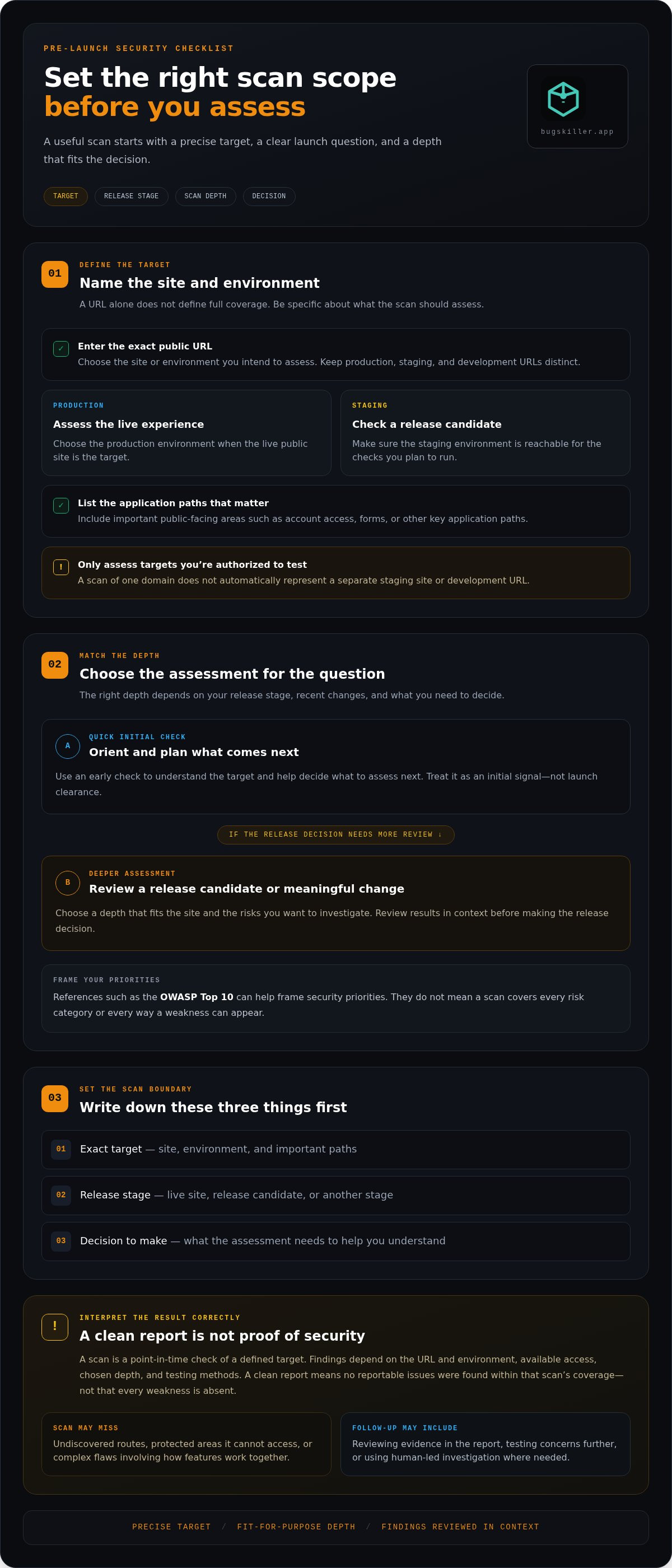
Start with a precise target. Enter the public URL for the site or environment you want to assess, then identify the pages and application paths that matter to your launch decision. A scan of your production domain won’t automatically represent a separate staging site or development URL. Keep environments distinct, and scan only targets you’re authorized to test.
Which website and environment should you scan?
Choose production to assess the live public experience. Choose staging to check a release candidate before it goes live, and make sure the environment is reachable for the checks you intend to run. List the key public-facing areas you want to assess, such as account access, forms, or other important application paths. Site behavior and available access affect what a scanner can inspect, so entering a URL alone doesn’t define full coverage.
How much scan depth does a pre-launch check need?
Match scan depth to the question you need answered. A quick initial check can help you understand the target and plan the next assessment. Treat it as an early signal, not final proof. For a release decision or a substantial application change, choose a deeper assessment that fits the site and the risks you want to investigate. Use references like the OWASP Top 10 to frame security priorities, not as a promise that any scan covers every risk category.
Scope and purpose
- Quick initial check: Use it for early orientation or to decide what to assess next. It’s a starting point, not launch clearance.
- Deeper scan: Use it when evaluating a release candidate or meaningful site changes. Choose a depth that supports the decision, then review the findings in context.
Before running a scan, write down the exact target, release stage, and decision you need to make. This keeps the scope focused and makes the report easier to act on. If you’re still defining the target, start with a free target check to help guide your scan plan.
Website Security Scan vs. Penetration Test: Know the Difference
A website security scan is useful pre-launch validation, but it isn’t a security guarantee. It automates checks against a selected target and can surface issues for follow-up. A penetration test uses human-led investigation to explore how weaknesses might be combined or how application behavior could be abused. Ongoing monitoring has a different purpose: it watches for changes or issues over time.
| Approach | What it does | Best used for | Key limit |
|---|---|---|---|
| Automated scanning | Runs repeatable checks against a defined website. | Finding potential weaknesses and reviewing a site before release or after changes. | Results depend on the target, access, scan depth, and tool. It may miss issues that need human judgment. |
| Manual penetration testing | A tester investigates the application through goal-oriented testing. | Exploring complex behavior, business logic, and ways separate weaknesses could combine. | It has a defined scope and time, so it does not prove that every risk is absent. |
| Ongoing monitoring | Checks for changes or availability issues over time. | Keeping watch on a changing website between release checks. | Monitoring is not the same as an in-depth security assessment. |
What automated scanning is good at
Automation makes it practical to repeat checks against the same selected website after a release or meaningful change. Plain-language findings can help a developer understand what was detected, where it appeared, and what to investigate next. Coverage still varies: two tools, or two scans of different targets, may not test the same paths or find the same issues.
When manual testing or monitoring serves a different purpose
A person can follow application flows, test assumptions, and probe behavior that a predefined automated check may not understand. Manual testing is useful when the concern involves how features interact, not just whether a familiar weakness appears. Monitoring, by contrast, helps track a site as it changes. These activities serve different purposes, and none guarantees security.
Don’t judge a report by its issue count alone. One clearly reproducible, exposed weakness may deserve attention before several lower-impact alerts. Review each finding’s evidence, affected area, and practical context. Confirm whether it can be reproduced, then prioritize the next investigation or follow-up. A concise report with actionable evidence can be more useful than a long list that leaves the team guessing.
Run a Website Security Scan and Turn Findings Into Next Steps
A report helps only when it leads to a clear decision. Use this workflow to move from the selected target to focused follow-up instead of treating every alert as equally urgent.
- Define the target. Confirm the exact website and environment you intend to assess. Keep the scope aligned with the release you’re preparing.
- Choose scan depth. Match the assessment to the release stage and the changes made. A major feature change may call for a deeper review than an early baseline check.
- Run the scan. Record when it ran and which target was assessed. This gives you a basis for comparing results with later checks.
- Review each finding. Read the description, affected URL, and available evidence. Check whether the issue relates to a public feature or an important user flow.
- Prioritize follow-up. Assign an owner and a next action. Track the investigation, any changes made, and the result of a follow-up check.
How to read scan findings without getting stuck
Severity labels are prioritization signals, not the whole story. Use them to sort attention, then consider the report context: which part of the site is affected, whether the feature is publicly exposed, and what the evidence shows. A high-severity label deserves prompt review, but the finding still needs to be understood in the context of your application. Don’t assume every alert has been confirmed through manual testing.
Keep a simple record for each finding: the affected area, evidence reviewed, decision made, person or team responsible, and follow-up result. If a finding can’t be reproduced or its impact is unclear, assign an investigation rather than dismissing it or treating it as confirmed risk.
What to do after the scan
Prioritize evidence-backed issues that affect exposed functionality or sensitive data. Route investigations and any needed fixes through your normal development workflow, such as a tracked task linked to the relevant release. After making changes, run a follow-up check against the updated target and note whether the finding remains, changes, or no longer appears. Retest results can inform the release decision, but they don’t prove that every other risk is gone.
A scan report is the starting point for remediation work, not a substitute for investigating and addressing the findings.
Run a website security scan to review findings and plan practical follow-up before launch.
Use BUGSKILLER for a Clear Website Security Scan Before Launch
Before launch, you need a practical view of the public site you’re preparing to release. With BUGSKILLER, enter the website URL, select a scan depth, then review the findings and report. Start with a free target check to help guide the scan plan. It’s a focused step toward a more informed release decision, not a promise that every flaw will be found.
What to expect from the BUGSKILLER website scan
Start with the public URL you want assessed. Choose scan depth based on the release stage and the questions your team needs to answer. The report presents security findings in plain language, so developers can understand what to review and decide on follow-up. Findings are delivered within minutes.
Keep the target in view as you read. A report reflects the website and scope assessed. It can help surface issues to investigate, but it can’t guarantee a flawless site or replace other security activities. Use the findings as input to your release decision, alongside your own checks and the context of the changes you’ve made.
Make the scan part of your release routine
Build a security check into moments when it can inform a decision: before the initial launch and after meaningful changes to public-facing features. Reassess the relevant target, review the latest findings, and route investigation or fixes through your development team’s normal workflow. Keep a record of the target, scan depth, findings, actions taken, and follow-up results. This gives the team a useful trail from assessment to release review.
Pair the scan with your existing pre-deployment checks. Start with the URL and scan depth that fit your release, then use the results to guide the next step. A clear check won’t remove every uncertainty, but it can help your team spot issues and make a more informed decision before the site goes live.
Start a free target check with BUGSKILLER.
Make Security Checks Part of Your Launch Plan
A useful website security scan starts with the right target and depth. Match the check to your release decision, then read findings in context instead of judging risk by alert count alone. Automated results can guide follow-up, but they don’t guarantee that every flaw has been found or replace other security work.
BUGSKILLER keeps the first step simple: enter your website URL, choose scan depth, and review plain-language findings in a report. Findings are delivered within minutes, and a free initial target check can help guide your scan plan. Use what you learn to decide what needs investigation before deployment.
Start a free target check and take a practical step toward a more informed launch. Clear scope, readable findings, and focused follow-up can help your team move forward with greater confidence.
Frequently Asked Questions
What does a website security scan check?
A website security scan checks a selected website for detectable security weaknesses and exposure. Depending on the tool, target, access, and scan depth, it may flag known vulnerabilities, risky configurations, or exposed pages and services. Coverage varies, so review the scan’s scope and the evidence behind each finding. A scan doesn’t necessarily inspect every page, protected area, or application flow.
Is an online website security scan enough before launch?
An online scan is a useful pre-launch check, but it shouldn’t be your only security step. It can surface potential issues in the selected target and help your team decide what to investigate. Review findings alongside your development checks and the changes in the release. A scan doesn’t guarantee security, and complex application behavior may need additional review or testing.
Can a website security scan find every vulnerability?
No. Automated scans can miss flaws, including issues that depend on how features interact, require access the scanner doesn’t have, or fall outside the selected scope. A report with no findings means the scan didn’t detect reportable issues within its coverage, not that every weakness is absent. Use the results to guide follow-up, not as proof that the site is flawless.
How often should I run a website security scan?
Run a scan before launch and again after meaningful changes to public-facing features. The right cadence depends on how often the site changes and what decisions your team needs to make. A scan provides a point-in-time view, so repeat checks help assess an updated target. Keep the scope consistent where useful, and record what changed between scans to make results easier to compare.
What is the difference between a vulnerability scan and a penetration test?
A vulnerability scan uses automated checks to identify potential known weaknesses in a defined target. A penetration test is a human-led, goal-oriented assessment that can investigate application behavior and complex flaws beyond automated checks. Both have limits and defined scopes. Use scanning for repeatable checks and early signals; use penetration testing when deeper investigation of specific risks or application behavior is needed.
What should I do after a website security scan finds an issue?
Review the finding’s description, affected URL, and available evidence before deciding what to do. Consider whether the affected feature is exposed and what data or user flow may be involved. Assign investigation and any needed changes through the appropriate development workflow. Track the action and outcome, then run a follow-up check against the updated target to see whether the finding remains.
Can I scan a website before it is publicly launched?
Yes, if the pre-launch target can be reached by the scanner and is included in the assessment scope. A staging environment or release candidate may be suitable when it’s accessible, but a private or restricted URL may prevent some checks. Make sure you’re authorized to scan the target. After launch, assess the public production site as well, since its configuration or behavior may differ.