

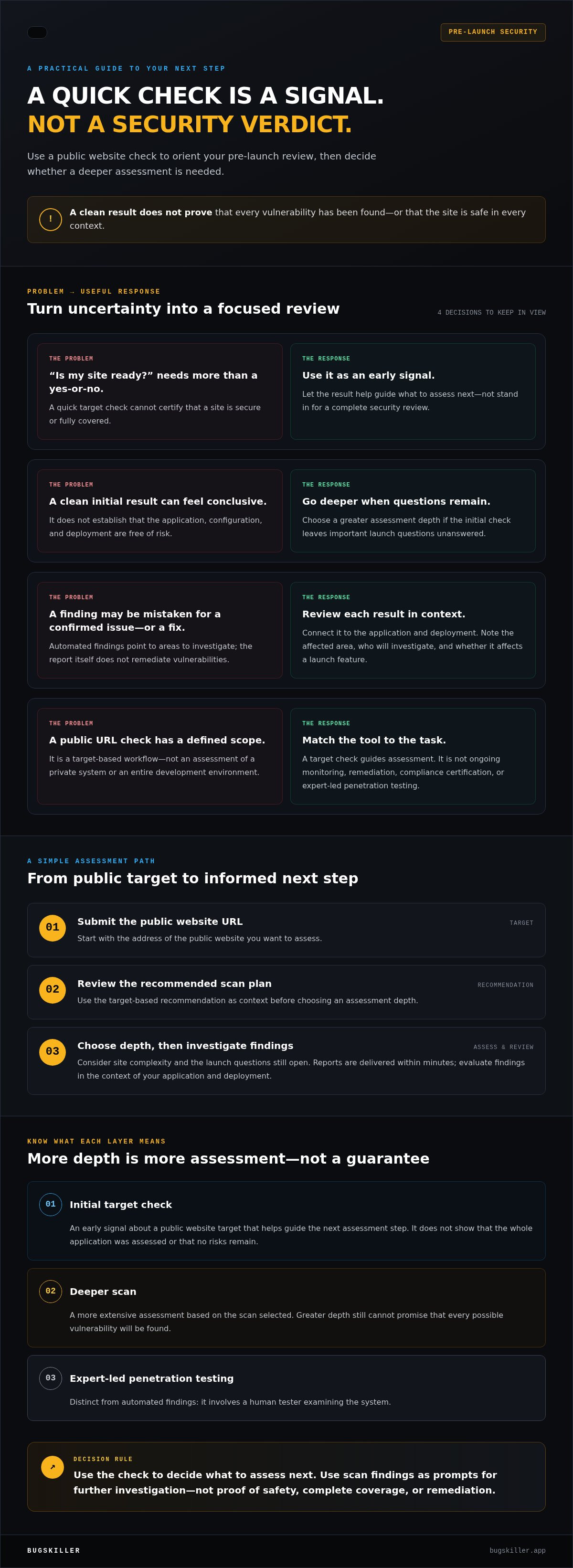
A free website security check can help you decide what to assess next, but it can’t certify that your site is safe to launch. Treat it as an early signal, not a final verdict. Before you publish, a quick check can help you understand whether your public website may need a deeper security scan.
It’s reasonable to want a clear yes-or-no answer before launch. Security checks don’t work that way: a quick target check has limits, and a clean result doesn’t prove that every vulnerability has been found. Still, it can turn uncertainty into a practical next step.
Submit your public website’s URL to get a recommended scan plan, then choose a scan depth and use the report to decide what to investigate. This article explains what a free website security check can reveal, what it can’t confirm, and how to judge whether a deeper scan makes sense before launch.
Key Takeaways
- Use a free website security check to orient your pre-launch review, not as proof that your site is fully secure.
- Submit a public website URL and use the recommended scan plan to choose a suitable scan depth.
- Understand the difference between an initial target check, a deeper scan, and ongoing monitoring.
- Review report findings in the context of your application and deployment before deciding what to do next.
- Choose greater assessment depth when the initial check leaves important launch questions unanswered.
What does a free website security check actually tell you?
Before launch, the practical question is whether a quick check can help you decide if your public website needs a deeper security scan. It can give you an initial signal about the target and a recommended next step. It doesn’t prove the site is secure or show that every weakness has been found.
A free website security check is an initial assessment of a public website target that helps guide the next security step. It isn’t a guarantee of safety or complete coverage.
That distinction matters. A target check focuses on the public-facing website you submit. It isn’t ongoing monitoring that watches for changes over time, remediation that fixes vulnerabilities, or compliance certification that verifies an organization against a standard. Each serves a different purpose. The NIST Cybersecurity Framework offers a shared language for managing cybersecurity risk, but a quick check is only one input into that broader work.
What is the difference between a free check and a deeper scan?
The free target check helps orient you by recommending a scan plan based on the public target. You can then choose a scan depth that fits your needs. A deeper scan is a more extensive assessment, not a promise that every issue will be detected. Automated findings can point developers toward areas to investigate, but they aren’t the same as expert-led penetration testing, which involves a human tester examining the system.
Think of the check as a direction, not a verdict. A clean initial result doesn’t establish that the application, its configuration, and its deployment are free of risk. Use scan findings as prompts for further investigation in context.
Who benefits most from a quick website security check?
Developers and founders preparing a public website or web app for launch can use a quick check to get an initial view before release. It’s especially useful for teams that want a practical starting point before choosing a scan depth. Enter the public URL, review the recommended plan, and decide whether the site needs a closer assessment.
Make the result actionable by connecting it to your launch work. For example, note which part of the site a finding concerns, who will investigate it, and whether the finding affects a feature that will be available at launch. The recommendation can help you decide whether broader scanning is a sensible next move. Neither result replaces your own review, but both can make it more focused.
How BUGSKILLER’s free website security check works
BUGSKILLER keeps the first step focused: submit a public website target, review the recommended plan, then decide how deeply to assess it. You don’t need to choose a scan depth without context. The free target check gives you a starting point for that decision.
- Enter a URL. Submit the address of the public website you want to assess.
- Review the recommendation. BUGSKILLER uses the target to suggest a scan plan.
- Choose scan depth. Select the level of assessment that fits your launch needs.
What happens after you enter a website URL?
The check starts with the public URL you provide. It’s a target-based workflow, not an assessment of a private system or an entire development environment. After reviewing the target, BUGSKILLER recommends a scan plan. Once you choose a scan, its findings are presented in plain language, with reports delivered within minutes, so your team can understand the output and decide what to inspect next.
Keep the scope in mind. The URL and recommendation help guide a website security assessment, but they don’t establish that every part of an application has been tested. For broader risk management context, NIST’s Cybersecurity Framework describes a wider approach to managing cybersecurity risk. A target check can inform your next step, but it isn’t a substitute for that broader work.
How should you use the recommended scan plan?
Match scan depth to your launch context. If you’re preparing a public site for release, use the recommendation to decide whether an initial check is enough to orient your review or whether a deeper scan is appropriate. Consider the site’s complexity and the questions your team still needs to answer. The plan supports a choice; it isn’t a security certification or a guarantee that the site has no vulnerabilities.
Once the scan report is ready, read each finding and consider how it relates to your application and deployment. Note what needs investigation and who on your team will follow up. Avoid treating a finding as a confirmed issue in every context, or a report as a fix. It’s information to evaluate and act on.
Use the free target check to submit a public website and see which scan plan is recommended. It’s a straightforward way to move from “Is this ready?” to a clearer decision about what to assess before launch.
What a free website security check can, and cannot, prove
A quick target check can help you decide what to investigate next. It can’t confirm that a website is secure in every context. The check provides a starting point for choosing a scan, while scan depth affects how much the assessment examines. No result should be treated as proof that every vulnerability has been found.
An automated scan reports what the assessment found; it is not a security guarantee.
| Activity | What it can tell you | What it cannot prove |
|---|---|---|
| Initial check | Provides an early signal about a public website target and helps guide the next assessment step. | That the whole application has been assessed or that no risks remain. |
| Deeper scan | Allows for greater assessment depth based on the selected scan. | That all possible vulnerabilities will be found or that the site is secure in every context. |
| Ongoing monitoring | Can track a system over time for changes or emerging issues, depending on the monitoring setup. | A one-time scan result cannot provide continuous visibility. |
Can a free check find every website vulnerability?
No. Don’t treat an initial check as proof that no risks exist. What an assessment can examine depends on its scope and depth. For example, a result about a public website target doesn’t automatically establish the security of every application component or deployment choice connected to it. Use findings to direct further investigation, not to close the question.
How is a security check different from monitoring or remediation?
A check or scan is an assessment at a point in time. Monitoring is ongoing observation, while remediation means addressing identified issues. A scan report can surface findings to investigate, but a finding isn’t a fix, and BUGSKILLER’s scan result doesn’t mean BUGSKILLER has changed your application.
Keep other forms of assurance separate, too. Automated scan results aren’t the same as human-led penetration testing, where a person actively tests a system. They also aren’t compliance certification. Each activity answers a different question, so don’t use one as a substitute for another.
A clean report can still be useful: it tells you what the assessment did not flag within its scope. Read it alongside your understanding of the application, deployment, and launch risks. If important uncertainty remains, choose a deeper assessment rather than treating a clean initial result as the final word.
How to act on your free website security check results
A report is useful when it leads to a clear next action. Review the report, understand each relevant finding, then decide whether to investigate further or move to a deeper assessment. Don’t treat the output as a to-do list without checking how each item relates to your application.
- Review the report. Note what part of the target each finding concerns.
- Check the context. Compare each item with your application behavior, configuration, and deployment.
- Choose the next step. Prioritize investigation, track issues through your team’s fix process, and decide whether to scan more deeply.
How do you prioritize findings before launch?
Start with findings that could affect exposed public functionality or sensitive data. Then consider the finding’s severity and whether it applies to the way your site is built and deployed. A result deserves investigation, but its practical impact depends on context. Don’t assume a report uses a particular severity label or that every finding carries the same risk.
Record each relevant item, assign it for investigation, and track it through your team’s own fix process. If you can’t determine whether a finding applies, treat that uncertainty as a reason to look closer before launch, not as evidence that the issue is harmless.
When should you move from a free check to a deeper scan?
Consider launch timing, application complexity, and your team’s risk tolerance. A public release that’s close, a more complex application, or uncertainty about important findings can all make greater assessment depth a sensible next step. The recommendation from your initial check gives you a practical prompt, but the decision should reflect what your team needs to assess before release.
If the result leaves important questions unanswered, don’t rely on a clean initial signal alone. Choose a deeper scan when you need a broader assessment of the public website. A separate website security scan guide can help readers compare scan-selection considerations; no single depth is right for every launch.
Ready to turn a public URL into a practical next step? Start the free target check, review the recommendation, and use the scan findings to plan what your team should investigate next.
Start with a free website security check, then choose your next step
A pre-launch check gives you a place to begin, not a final verdict. Use the recommendation to orient your review, then choose a scan depth that fits the target and your launch needs. This gives your team a clearer plan without treating one result as proof that no further assessment is needed.
What should you have ready before starting?
Prepare the public website URL you want to check. Note where the site is in its release cycle, whether it’s still in development, in staging, or approaching public launch. That context helps your team judge what should happen next. Decide who will review the scan findings and coordinate follow-up so the report has a clear owner.
Keep the workflow simple:
- Enter the public website URL.
- Review the recommended scan plan.
- Choose a scan depth suited to your assessment needs.
What is the next step after the initial check?
Review the plan and decide whether its recommended scan depth fits the site’s complexity and your remaining launch questions. Then read the plain-language report and investigate relevant findings in your application and deployment context. A useful finding should lead to a decision: investigate further, track it through your team’s fix process, or select a deeper assessment.
Use the same discipline for release preparation as a whole. Security scanning is one part of getting a site ready; your team should also follow its broader launch checks. A pre-launch security checklist can help organize that work, while the initial check helps point to a practical next assessment step.
The goal isn’t to make a quick check answer every security question. It’s to help you decide what deserves closer attention before the site is public. Start with a free website security check, use the recommendation to choose scan depth, and let the report guide your next review.
Start BUGSKILLER’s free target check with your public website URL, then review the recommended scan plan.
Make your next launch decision with clarity
A free website security check gives you an initial signal, not a final security verdict. Use it to review your public target, understand the scan findings, and decide whether a deeper scan fits your launch needs. The recommended scan plan helps guide that choice, while plain-language findings and a report delivered within minutes give your team a practical starting point for further investigation.
Ready to check your website before launch? Start your free website security check and use the recommended plan to choose your next step.
Frequently Asked Questions
What is a free website security check?
A free website security check is an initial assessment of a public website target, not a guarantee that the site is secure. With BUGSKILLER, you submit a public URL and receive a recommended scan plan to help choose what to assess next. The check can provide a useful first step before launch, but its result doesn’t prove that every vulnerability has been found or that all parts of an application were examined.
Is a free website security check enough before launch?
It can be a useful first step, but it may not answer every question your team needs to resolve before launch. Review the scan findings, consider how they apply to your application and deployment, and use the recommended plan to decide whether to select a deeper scan. A clean initial result isn’t a launch approval or a guarantee. Match the next assessment step to the site’s complexity and your remaining security questions.
Can a free website security check find every vulnerability?
No. An initial check shouldn’t be treated as proof that a website has no vulnerabilities. What a scan can examine depends on its scope and depth, and no result should be taken as complete coverage of every application component or configuration. Treat findings as leads for investigation. If the site has important functionality or unresolved questions before release, consider whether a deeper assessment is appropriate.
How do I check whether my website has security issues?
Start by assessing the public website and reviewing the resulting scan report. With BUGSKILLER, enter the public URL, review the recommended scan plan, then choose a scan depth that fits your assessment needs. Read the findings carefully and compare them with your application and deployment context. Track relevant issues through your team’s investigation and fix process. A scan can guide this work, but it doesn’t replace your own review or guarantee that no risks remain.
What happens after I enter my website URL for a security check?
After you submit a public website URL, BUGSKILLER uses the target to recommend a scan plan. You can review that recommendation and choose a scan depth for the security scan. Findings are presented in plain language, and reports are delivered within minutes. Use the report to understand what the assessment found and decide what deserves further investigation. The URL-based initial check is for a public website target, not a private system.
Does a website security check fix the vulnerabilities it finds?
No. A website security check assesses a target and reports findings; it doesn’t mean the identified issues have been fixed. Use relevant results to guide investigation, then track any needed changes through your own development and deployment process. For example, if a finding appears connected to a particular feature, your team can check whether it applies and determine how to address it. Don’t treat a report as evidence of remediation.
How is a website security check different from penetration testing?
A website security check uses an automated assessment to provide findings about a target. Human-led penetration testing involves a person actively testing a system, so it is a different kind of assessment. Neither term should be used to imply ongoing monitoring or automatic fixes. Choose the assessment based on what you need to evaluate before launch.
Can I scan a website that is not publicly accessible?
BUGSKILLER’s initial target check is designed for a public website URL, so a private or inaccessible site can’t be assessed through that public-target workflow. If your site is still in development or staging, note its current state as you plan the next assessment step. Once you have a public target to submit, enter its URL, review the recommended scan plan, and choose a scan depth that fits your needs.

